Blogger Hack: Turning Labels into Tabs
Below are the instructions on how to turn "Labels into Horizontal Tabs," my third hacking attempt. Many thanks for the Exploding Boy website for making it free for everyone to use (I just couldn't help it by referring to a Beatles song, but indeed your contribution to this hack is about 75%, I'd say :-)
Step 0: Label your posts.
Make sure your blog has some posts with label assigned, otherwise nothing will get created. See this topic on how to create labels:
http://help.blogger.com/bin/answer.py?answer=44498&topic=9084
Step 1: Downloading and unzipping the file from the Exploding Boy website
(You can skip this step if you are going to useRamani's hosted pics in step 3.)
Here are the downloading and sample links:
http://www.exploding-boy.com/2005/12/15/free-css-navigation-designs/
http://exploding-boy.com/images/cssmenus/menus.html
Step 2: Changing the Header to become appendable.
Modify this line:
<b:section class="header" id="header" maxwidgets="1" showaddelement="no">
to become
<b:section class="header" id="header" maxwidgets="2" showaddelement="yes">
Step 3: Preparation the CSS portion of the hack.
Go to the very end of this article and cut the CSS portion you like there, then paste it at the very end of the CSS code (right before the closing CDATA part - see picture below)
Below is an example of pasting the code for style F:
/*- Menu Tabs F By http://www.exploding-boy.com/2005/12/15/free-css-navigation-designs/------
*/
#tabsF {
float:left;
width:100%;
font-size:80%;
line-height:normal;
border-bottom:1px solid #000;
}
#tabsF ul {
margin:0;
padding:10px 10px 0 50px;
list-style:none;
}
#tabsF li {
display:inline;
margin:0;
padding:0;
}
#tabsF a {
float:left;
background:url(" http://www.anniyalogam.com/labeltabs/tableftF.gif") no-repeat left top;
margin:0;
padding:0 0 0 4px;
text-decoration:none;
}
#tabsF a span {
float:left;
display:block;
background:url(" http://www.anniyalogam.com/labeltabs/tabrightF.gif") no-repeat right top;
padding:5px 15px 4px 6px;
color:#666;
}
/* Commented Backslash Hack hides rule from IE5-Mac \*/
#tabsF a span {float:none;}
/* End IE5-Mac hack */
#tabsF a:hover span {
color:#FFF;
}
#tabsF a:hover {
background-position:0% -42px;
}
#tabsF a:hover span {
background-position:100% -42px;
}
The pictures the CSS code is referring to are gracefully hosted by Ramani of Hackosphere. Thanks, Ramani. (Of course, if you download the zip file, you can manually upload the corresponding files to Blogger Beta instead.)
Step 4: Adding Label Widget
Follow the instructions from this article, especially step B.4. After you've done with inserting the code & save it, go to Page Element option and drag the newly added widget to stay under the Header area (that we fixed so that it would accomodate this new widget.)
<b:widget id='Label10' locked='false' title='' type='Label'>
<b:includable id='main'>
<div id='tabsF'>
<ul>
<li><a expr:href='data:blog.homepageUrl'><span>Home</span></a></li>
<b:loop values='data:labels' var='label'>
<li><a expr:href='data:label.url'><span><data:label.name/></span></a></li>
</b:loop>
</ul>
<!-- <b:include name='quickedit'/> -->
</div>
</b:includable>
</b:widget>
If you use a style other than F, than make sure id='tabsF' reflects the correct tab, such as id='tabsE' for style E. Later, if you like a different design, just cut-and-paste the style's CSS code, then change this id again to reflect the change.
Update (9/16/06): Please see my improved code at the end of this article if you would like to exclude some tabs from showing.
There you have it! Well-designed tabs from professionals (The Exploding Boy website) being integrated into the new Blogger Beta.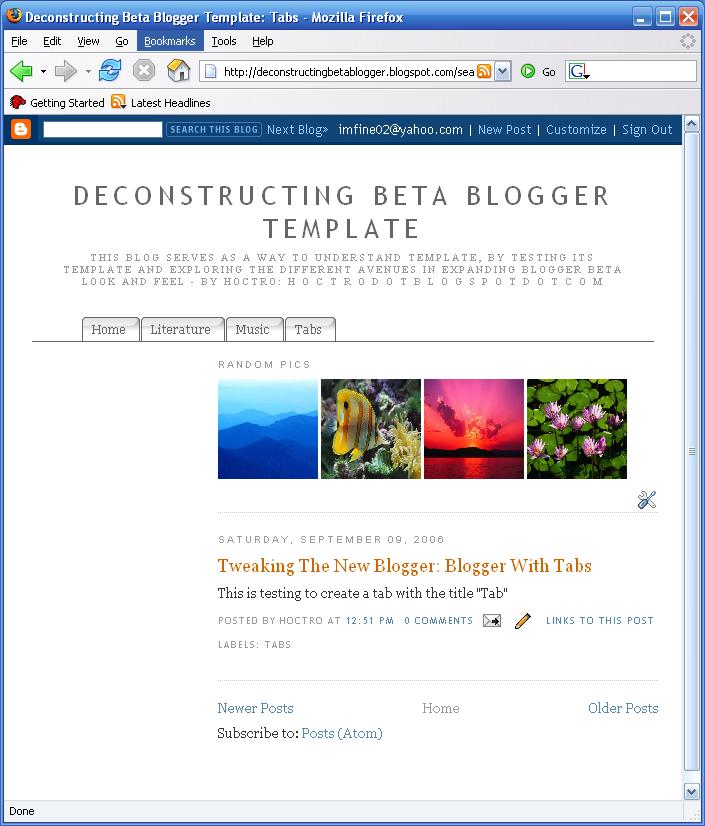
I would like to thank Mr. Ramani for his contructive comments to make this tutorial more readable and to make this hack much easier for you to install on your blog.
Have a nice day and see you next time,
Cheers,
Appendix A: CSS code from style A to F
/*- Menu Tabs A --------------------------- */
#tabs {
float:left;
width:100%;
background:#BBD9EE;
font-size:93%;
line-height:normal;
}
#tabs ul {
margin:0;
padding:10px 10px 0 50px;
list-style:none;
}
#tabs li {
display:inline;
margin:0;
padding:0;
}
#tabs a {
float:left;
background:url("http://www.anniyalogam.com/labeltabs/tableft.gif") no-repeat left top;
margin:0;
padding:0 0 0 4px;
text-decoration:none;
}
#tabs a span {
float:left;
display:block;
background:url("http://www.anniyalogam.com/labeltabs/tabright.gif") no-repeat right top;
padding:5px 15px 4px 6px;
color:#666;
}
/* Commented Backslash Hack hides rule from IE5-Mac \*/
#tabs a span {float:none;}
/* End IE5-Mac hack */
#tabs a:hover span {
color:#FF9834;
}
#tabs a:hover {
background-position:0% -42px;
}
#tabs a:hover span {
background-position:100% -42px;
}
/*- Menu Tabs B--------------------------- */
#tabsB {
float:left;
width:100%;
background:#F4F4F4;
font-size:93%;
line-height:normal;
}
#tabsB ul {
margin:0;
padding:10px 10px 0 50px;
list-style:none;
}
#tabsB li {
display:inline;
margin:0;
padding:0;
}
#tabsB a {
float:left;
background:url("http://www.anniyalogam.com/labeltabs/tableftB.gif") no-repeat left top;
margin:0;
padding:0 0 0 4px;
text-decoration:none;
}
#tabsB a span {
float:left;
display:block;
background:url("http://www.anniyalogam.com/labeltabs/tabrightB.gif") no-repeat right top;
padding:5px 15px 4px 6px;
color:#666;
}
/* Commented Backslash Hack hides rule from IE5-Mac \*/
#tabsB a span {float:none;}
/* End IE5-Mac hack */
#tabsB a:hover span {
color:#000;
}
#tabsB a:hover {
background-position:0% -42px;
}
#tabsB a:hover span {
background-position:100% -42px;
}
/*- Menu Tabs C--------------------------- */
#tabsC {
float:left;
width:100%;
background:#EDF7E7;
font-size:93%;
line-height:normal;
}
#tabsC ul {
margin:0;
padding:10px 10px 0 50px;
list-style:none;
}
#tabsC li {
display:inline;
margin:0;
padding:0;
}
#tabsC a {
float:left;
background:url("http://www.anniyalogam.com/labeltabs/tableftC.gif") no-repeat left top;
margin:0;
padding:0 0 0 4px;
text-decoration:none;
}
#tabsC a span {
float:left;
display:block;
background:url("http://www.anniyalogam.com/labeltabs/tabrightC.gif") no-repeat right top;
padding:5px 15px 4px 6px;
color:#464E42;
}
/* Commented Backslash Hack hides rule from IE5-Mac \*/
#tabsC a span {float:none;}
/* End IE5-Mac hack */
#tabsC a:hover span {
color:#FFF;
}
#tabsC a:hover {
background-position:0% -42px;
}
#tabsC a:hover span {
background-position:100% -42px;
}
/*- Menu Tabs D--------------------------- */
#tabsD {
float:left;
width:100%;
background:#FCF3F8;
font-size:93%;
line-height:normal;
border-bottom:1px solid #F4B7D6;
}
#tabsD ul {
margin:0;
padding:10px 10px 0 50px;
list-style:none;
}
#tabsD li {
display:inline;
margin:0;
padding:0;
}
#tabsD a {
float:left;
background:url("http://www.anniyalogam.com/labeltabs/tableftD.gif") no-repeat left top;
margin:0;
padding:0 0 0 4px;
text-decoration:none;
}
#tabsD a span {
float:left;
display:block;
background:url("http://www.anniyalogam.com/labeltabs/tabrightD.gif") no-repeat right top;
padding:5px 15px 4px 6px;
color:#C7377D;
}
/* Commented Backslash Hack hides rule from IE5-Mac \*/
#tabsD a span {float:none;}
/* End IE5-Mac hack */
#tabsD a:hover span {
color:#C7377D;
}
#tabsD a:hover {
background-position:0% -42px;
}
#tabsD a:hover span {
background-position:100% -42px;
}
/*- Menu Tabs E--------------------------- */
#tabsE {
float:left;
width:100%;
background:#000;
font-size:93%;
line-height:normal;
}
#tabsE ul {
margin:0;
padding:10px 10px 0 50px;
list-style:none;
}
#tabsE li {
display:inline;
margin:0;
padding:0;
}
#tabsE a {
float:left;
background:url("http://www.anniyalogam.com/labeltabs/tableftE.gif") no-repeat left top;
margin:0;
padding:0 0 0 4px;
text-decoration:none;
}
#tabsE a span {
float:left;
display:block;
background:url("http://www.anniyalogam.com/labeltabs/tabrightE.gif") no-repeat right top;
padding:5px 15px 4px 6px;
color:#FFF;
}
/* Commented Backslash Hack hides rule from IE5-Mac \*/
#tabsE a span {float:none;}
/* End IE5-Mac hack */
#tabsE a:hover span {
color:#FFF;
}
#tabsE a:hover {
background-position:0% -42px;
}
#tabsE a:hover span {
background-position:100% -42px;
}
/*- Menu Tabs F--------------------------- */
#tabsF {
float:left;
width:100%;
background:#efefef;
font-size:93%;
line-height:normal;
border-bottom:1px solid #666;
}
#tabsF ul {
margin:0;
padding:10px 10px 0 50px;
list-style:none;
}
#tabsF li {
display:inline;
margin:0;
padding:0;
}
#tabsF a {
float:left;
background:url("http://www.anniyalogam.com/labeltabs/tableftF.gif") no-repeat left top;
margin:0;
padding:0 0 0 4px;
text-decoration:none;
}
#tabsF a span {
float:left;
display:block;
background:url("http://www.anniyalogam.com/labeltabs/tabrightF.gif") no-repeat right top;
padding:5px 15px 4px 6px;
color:#666;
}
/* Commented Backslash Hack hides rule from IE5-Mac \*/
#tabsF a span {float:none;}
/* End IE5-Mac hack */
#tabsF a:hover span {
color:#FFF;
}
#tabsF a:hover {
background-position:0% -42px;
}
#tabsF a:hover span {
background-position:100% -42px;
}
/*- Menu Tabs G--------------------------- */
#tabsG {
float:left;
width:100%;
background:#666;
font-size:93%;
line-height:normal;
}
#tabsG ul {
margin:0;
padding:10px 10px 0 50px;
list-style:none;
}
#tabsG li {
display:inline;
margin:0;
padding:0;
}
#tabsG a {
float:left;
background:url("http://www.anniyalogam.com/labeltabs/tableftG.gif") no-repeat left top;
margin:0;
padding:0 0 0 4px;
text-decoration:none;
}
#tabsG a span {
float:left;
display:block;
background:url("http://www.anniyalogam.com/labeltabs/tabrightG.gif") no-repeat right top;
padding:5px 15px 4px 6px;
color:#FFF;
}
/* Commented Backslash Hack hides rule from IE5-Mac \*/
#tabsG a span {float:none;}
/* End IE5-Mac hack */
#tabsG a:hover span {
color:#FFF;
}
#tabsG a:hover {
background-position:0% -42px;
}
#tabsG a:hover span {
background-position:100% -42px;
}
/*- Menu Tabs H--------------------------- */
#tabsH {
float:left;
width:100%;
background:#000;
font-size:93%;
line-height:normal;
}
#tabsH ul {
margin:0;
padding:10px 10px 0 50px;
list-style:none;
}
#tabsH li {
display:inline;
margin:0;
padding:0;
}
#tabsH a {
float:left;
background:url("http://www.anniyalogam.com/labeltabs/tableftH.gif") no-repeat left top;
margin:0;
padding:0 0 0 4px;
text-decoration:none;
}
#tabsH a span {
float:left;
display:block;
background:url("http://www.anniyalogam.com/labeltabs/tabrightH.gif") no-repeat right top;
padding:5px 15px 4px 6px;
color:#FFF;
}
/* Commented Backslash Hack hides rule from IE5-Mac \*/
#tabsH a span {float:none;}
/* End IE5-Mac hack */
#tabsH a:hover span {
color:#FFF;
}
#tabsH a:hover {
background-position:0% -42px;
}
#tabsH a:hover span {
background-position:100% -42px;
}
/*- Menu Tabs I--------------------------- */
#tabsI {
float:left;
width:100%;
background:#EFF4FA;
font-size:93%;
line-height:normal;
border-bottom:1px solid #DD740B;
}
#tabsI ul {
margin:0;
padding:10px 10px 0 50px;
list-style:none;
}
#tabsI li {
display:inline;
margin:0;
padding:0;
}
#tabsI a {
float:left;
background:url("http://www.anniyalogam.com/labeltabs/tableftI.gif") no-repeat left top;
margin:0;
padding:0 0 0 5px;
text-decoration:none;
}
#tabsI a span {
float:left;
display:block;
background:url("http://www.anniyalogam.com/labeltabs/tabrightI.gif") no-repeat right top;
padding:5px 15px 4px 6px;
color:#FFF;
}
/* Commented Backslash Hack hides rule from IE5-Mac \*/
#tabsI a span {float:none;}
/* End IE5-Mac hack */
#tabsI a:hover span {
color:#FFF;
}
#tabsI a:hover {
background-position:0% -42px;
}
#tabsI a:hover span {
background-position:100% -42px;
}
/*- Menu Tabs J--------------------------- */
#tabsJ {
float:left;
width:100%;
background:#F4F4F4;
font-size:93%;
line-height:normal;
border-bottom:1px solid #24618E;
}
#tabsJ ul {
margin:0;
padding:10px 10px 0 50px;
list-style:none;
}
#tabsJ li {
display:inline;
margin:0;
padding:0;
}
#tabsJ a {
float:left;
background:url("http://www.anniyalogam.com/labeltabs/tableftJ.gif") no-repeat left top;
margin:0;
padding:0 0 0 5px;
text-decoration:none;
}
#tabsJ a span {
float:left;
display:block;
background:url("http://www.anniyalogam.com/labeltabs/tabrightJ.gif") no-repeat right top;
padding:5px 15px 4px 6px;
color:#24618E;
}
/* Commented Backslash Hack hides rule from IE5-Mac \*/
#tabsJ a span {float:none;}
/* End IE5-Mac hack */
#tabsJ a:hover span {
color:#FFF;
}
#tabsJ a:hover {
background-position:0% -42px;
}
#tabsJ a:hover span {
background-position:100% -42px;
}
/*- Menu Tabs K--------------------------- */
#tabsK {
float:left;
width:100%;
background:#E7E5E2;
font-size:93%;
line-height:normal;
border-bottom:1px solid #54545C;
}
#tabsK ul {
margin:0;
padding:10px 10px 0 50px;
list-style:none;
}
#tabsK li {
display:inline;
margin:0;
padding:0;
}
#tabsK a {
float:left;
background:url("http://www.anniyalogam.com/labeltabs/tableftK.gif") no-repeat left top;
margin:0;
padding:0 0 0 4px;
text-decoration:none;
}
#tabsK a span {
float:left;
display:block;
background:url("http://www.anniyalogam.com/labeltabs/tabrightK.gif") no-repeat right top;
padding:5px 15px 4px 6px;
color:#FFF;
}
/* Commented Backslash Hack hides rule from IE5-Mac \*/
#tabsK a span {float:none;}
/* End IE5-Mac hack */
#tabsK a:hover span {
color:#FFF;
background-position:100% -42px;
}
#tabsK a:hover {
background-position:0% -42px;
}
#tabsK a:hover span {
background-position:100% -42px;
}
Major Update (9/16/06):
1. Ramani posts an improvement of my hack, showing only tabs that have the most posts. You can view it here.
2. I also thought a lot about the possibility of showing in the tab line with only the labels we want to show. Finally today I got it to work, with the help of JavaScript. If you don't mind adding a period at the back of the label for every post belong to that label/category, then use this code instead of the code in step 4. I also add the "Home" tab as well, following Ramani's improvement.
Make sure the label name (in bold below) corresponds to the label you are visually created in Step 2. Also, the two other bold text showing where to change tabF to other kind of tabs (as discussed in this article.)
<b:widget id='Label1' locked='false' title='' type='Label'>
<b:includable id='main'>
<div class='widget-content'>
<div id='tabsF'>
</div>
</div>
<script language='javascript' type='text/javascript'>
var display = "<ul>";
display = display + "<li><a expr:href='data:blog.homepageUrl'><span>Home</span></a></li>";
var text = "";
var text2 = "";
<b:loop values='data:labels' var='label'>
text = "<data:label.name/>";
text2 = text.charAt(text.length - 1);
if (text2 != '.') {
display = display + "<li><a expr:href='data:label.url + "?max-results=100"'><span>" + text + "</span></a></li>";
}
</b:loop>
display = display + "</ul>";
obj = document.getElementById('tabsF');
obj.innerHTML = display;
</script>
</b:includable>
</b:widget>
The secret to this improved hack is in capturing the tab's name at the time the server is passing the page back with data materialized as texts. Notice the two quotes around the data itself. It took me a couple of hours to find out about this! :-)
text = "<data:label.name/>";
will turn into this, for example:
text = "About Me.";
Once the text is captured, we can do all kind of tricks, such as finding if there is a period '.' at the end of the text, if not then prints the line:
text2 = text.charAt(text.length - 1);
if (text2 != '.') {
...
There you have it, two variations of the original tab hack. Each has its own pros and cons, so feel free to try and use both :-)


