Blogger Beta: Recent Comments/Posts Beta Widget using JSON feeds
Today, I will offer you a widget that will allow you to view 20+ recent comments or posts headlines of your blog, and you don't even have to know the format of your post or comment feeds. Also with an easy tweak, you could get recent posts or comments from any public blogs, such as mine :-)
But first, some introduction on how this article - and this hack - is done overnight (instead of my "Recent Articles" hack :-) If you follow my recent thinking on ways to hack the New Blogger, you'll see that I try to use Ajax to bring in feed data such as recent comments, recent posts, etc. Well, forget Ajax (for now :-)!
r
A very recent post from Phydeaux3 brings great attention to me last night (11/21), in which he reports the news from Blogger Buzz and from Official Google Data API Blog that you can now bring back data from any public blogs (yours and mine included) in JSON format. This is great news, because JSON is much more easier to work with ( since data already available in data structure and array-like format.) Not only that, what this means is that returning data are instantly available for all platforms, thus solving my Ajax bug where data only showed in Firefox.
Without further ado, here is how to install this hack to your blog. [This is the place where I got most of the code from: http://code.google.com/apis/gdata/blogger_sample.html . What I did in extra was to turn a button into an automatic execution of code, and personalized the code from a chosen one into your own, courtesy of a split() JavaScript command to get your blog name, such as "hoctro.blogspot.com"]
First, follow the instructions from this article Hacking Technique: How To Modify a (Beta) Template, in particular section B.4.
Then, cut this code below and paste it in between any two "b:widget" tags, save the template, and you're done.
<b:widget id='HTML20' locked='false' title='Recent Comments' type='HTML'>
<b:includable id='main'>
<!-- only display title if it's non-empty -->
<b:if cond='data:title != ""'>
<h2 class='title'><data:title/></h2>
</b:if>
<div class='widget-content'>
<!-- <data:content/> -->
</div>
<div id='data'/>
<b:include name='quickedit'/>
<script type='text/javascript'>
/** Code taken from Sample at Code.Google.com **/
/**
* Lists blog entries from the specified JSON feed
* by creating a new 'ul' element in the DOM. Each
* bullet is the title of one blog entry, and contains
* a hyperlink to that entry's URL.
*/
function listEntries(json) {
var ul = document.createElement('ul');
for (var i = 0; i < json.feed.entry.length; i++) {
var entry = json.feed.entry[i];
var alturl;
for (var k = 0; k < entry.link.length; k++) {
if (entry.link[k].rel == 'alternate') {
alturl = entry.link[k].href;
break;
}
}
var li = document.createElement('li');
var a = document.createElement('a');
a.href = alturl;
var txt = document.createTextNode(entry.title.$t);
a.appendChild(txt);
li.appendChild(a);
ul.appendChild(li);
}
document.getElementById('data').appendChild(ul);
}
function search(query, type) {
removeOldQueryResults();
var script = document.createElement('script');
script.setAttribute('src', 'http://' + query + '/feeds/' + type +
'/default?alt=json-in-script&callback=listEntries');
script.setAttribute('type', 'text/javascript');
document.documentElement.firstChild.appendChild(script);
}
/**
* Removes results from the previous search, including
* the bullet list of blog entries and the script object
* used to obtain the feed.
*/
function removeOldQueryResults() {
// Remove the script element used to perform the query.
var script_nodes = document.getElementsByTagName('script');
for (var i = 0; i < script_nodes.length; i++) {
var cur_node = script_nodes[i];
if (cur_node.src && cur_node.src.indexOf('json') != -1) {
cur_node.parentNode.removeChild(cur_node);
}
}
// Remove the bullet list of blog entries.
var div = document.getElementById('data');
if (div.firstChild) {
div.removeChild(div.firstChild);
}
}
homeUrl = "<data:blog.homepageUrl/>";
var arr = new Array(4);
arr = homeUrl.split("/",4);
// To change from your blog to someone else (like mine,) do this:
// search("hoctro.blogspot.com", "comments");
// To change from recent comments to recent posts, do this:
// search(arr[2], "posts");
search(arr[2], "comments");
</script>
</b:includable>
</b:widget>
To change "recent feeds" to "recent posts" is very easy, change the bold line at the end of the widget from
search(arr[2], "comments");
to
search(arr[2], "posts");
Similarly, if you want to see other blog's (such as my blog :-) "recent comments," change the line to become
search("hoctro.blogspot.com", "comments");
Here is a picture of "Recent Comments" on my blog viewing with Firefox,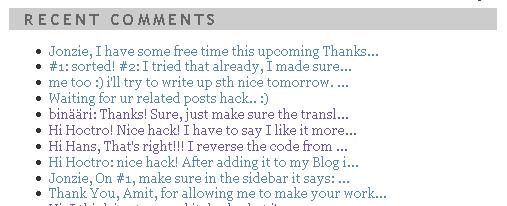
and viewing using Internet Explorer 6.
I'm really happy that my "recent comments/posts" hacking attempts have come to a very happy ending, thanks to the new available JSON feed format.
Cheers (and have a very Happy Thanksgiving for my American readers,)


